- The Automation Exchange
- Posts
- Issue #40: 🤖 Muhammed’s “Mookie” Agent You Can Sell For $99
Issue #40: 🤖 Muhammed’s “Mookie” Agent You Can Sell For $99
rinse and repeart then retire!

Kate .
November 14, 2025
Workflow of the Week 🚀
Who Built It: Muhammed
What It Does: Muhammed’s “Mookie” workflow builds a fully automated AI Document Assistant that turns your PDFs into a searchable, conversational chatbot — powered by GPT-4, Mistral embeddings, and PostgreSQL with PGVector.
It connects Google Drive and Telegram to auto-ingest new PDFs, process them into embeddings, and store them in a vector database. Then, when users ask questions via Telegram or a web interface, the agent retrieves relevant document chunks and responds contextually — without hallucinating or guessing.
Think of it as your personal AI librarian that instantly answers questions about your internal docs, reports, or manuals.
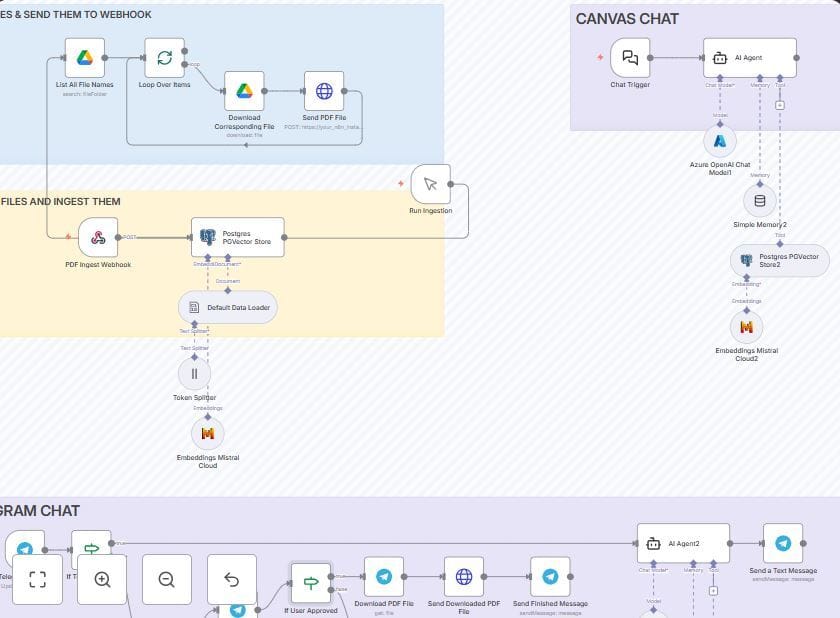
Where to Find It: 👉 Access Muhammed’s PDF RAG Agent Workflow
Why It’s Incredible: This workflow takes the concept of “Chat with your documents” and turns it into a deployable system that integrates multiple tools — no custom backend required.
Key Advantages:
📂 Auto-ingests PDFs from Google Drive or Telegram uploads
🧠 Retrieves accurate answers using vector similarity search (no hallucinations)
💬 Works across Telegram and web chat interfaces
🔁 Maintains per-user memory for contextual, natural conversations
⚙️ Fully modular — swap GPT-4 for your preferred LLM
📊 Difficulty Rating:
🌊🌊🌊 (3/5 — Intermediate setup; requires multiple API keys and PostgreSQL)
💰 Get The Bag – Monetize This Workflow
1) Build AI Assistants for Course Creators & Coaches
Create a custom “Course Q&A Bot” that answers student questions directly from their PDF course materials. Handle ingestion and hosting as a done-for-you service.
💵 Charge: $500 setup + $50–$150/month hosting.
💡 Pro Tip: Add analytics (FAQs, most-asked topics) for upsells.
2) Internal Knowledge Assistant for Teams
Train Mookie on HR manuals, SOPs, or policy PDFs — and deploy it as a secure internal knowledge base accessible via Telegram.
💵 Charge: $1,000 setup + $200/month for updates and monitoring.
💡 Pro Tip: Offer Slack or Teams integration for enterprise upsells.
3) White-Label “AI PDF Assistant Kit”
Package the workflow (with permission) with setup docs, PostgreSQL templates, and credential guides. Sell it as a prebuilt kit for agencies or automation freelancers.
💵 Charge: $299–$499 one-time, or $99 setup add-on.
💡 Pro Tip: Include a Loom walkthrough and Carrd landing page template to reduce support time.
🔥 Weekend Hustle - Build and Ship by Monday
Turn Muhammed’s workflow into your own demo product this weekend and use it to book a paying client by Monday.
Step-by-Step Action Plan
Import & Customize:
Clone Muhammed’s workflow and rebrand it as “DocuBuddy” or “PDFBrain.”
Connect your Telegram bot and upload 2–3 public PDFs (e.g., free guides or reports).
Test by asking questions like “Summarize section 3” or “What are the key findings?”
Build Your Offer:
Record a 30–45 second demo showing you chatting with the PDF.
Post it on LinkedIn or X with a caption like: “Built this weekend: an AI bot that reads PDFs and answers questions for your students or clients. Want one? Comment ‘BOT’ below.”
If you don’t have social media set up send it via DM or email to possible clients.
Outreach – Use the “Live Demo” Hook:
Instead of cold DMs, lead with curiosity. Send your video directly to creators, coaches, or consultants who publish digital courses or reports.
Ask:
“Would you like a version of this that answers questions from your own PDFs?”
Take this furture by recording personalized videos for each person/business you contact.
Convert:
Offer a $99 pilot setup (one PDF + Telegram access) — then upsell full hosting if they like the result. remember you can change the input trigger if they don’t have Telegram.
Bonus Plays
Post short clips of the chat demo on TikTok or Reels (“My AI reads PDFs so I don’t have to 📚”).
Submit your demo to AI and automation communities (IndieHackers, r/NoCode, or AutomationNation).
Turn the first client into a case study: “How a PDF chatbot saved my client 10+ hours a week.”
Resources:
Landing page tools: Typedream, Notion, or Framer
Screen recording: Loom or OBS
Thanks for reading.
Need to hire an AI expert? Just email me, let me know what you need and we will reach out to our builders list to find the talent that can help.
Have a great weekend and remember - Code Less, Create More!
Kate
|

|

(This newsletter may contain affiliate links, and I may earn a commission if you make a purchase through those links)